Rachel, from the truck

“Met Dana Ruiz today, she owns the house at 812 Oak Street in Glenview. Hail took off a bunch of shingles, she's got a State Farm claim going. She wants our estimate by Friday.”

What got saved, 5 seconds later

  • + ContactDana Ruiz
  • + Property812 Oak Street, Glenview
  • + JobRe-roof · New Lead · State Farm claim · Rachel
  • + VisitSite visit, today, hail damage noted
  • + TaskSend Dana the estimate · due Friday 11/20

$ applied one change, linked together UNDO

Nobody typed a form. It knew Friday meant the 20th, that Rachel was the estimator because she was the one talking, and that the house and the job are two records linked to Dana, so the next job at that address starts with its history. Two days later, “sent Dana the estimate, 14,200” set the amount, moved the job to Estimate Sent, and checked off the task.

WHY_CRMS_DIE

The CRM was fine. Nobody kept it up.

The big CRMs are built to sell to every kind of business at once. So they come with forty fields you don't use, a pipeline shaped like a software company's, and a per-seat bill. Your guys finish a site visit, look at that screen, and decide they'll enter it later. Later never comes, and in three months the CRM is a list of names nobody trusts.

A suit off the rack fits a man who doesn't exist. This is the made-to-measure one: only the things you track, in the order you do them, and a way to update it that takes about as long as saying it out loud.

HOW_IT_WORKS

From five questions to a working CRM.

  1. 01 · MEASURE

    Five questions

    • What do you do, and who pays you for what?
    • What kinds of customers do you want to keep track of? One line each.
    • How does a job go from the first call to paid?
    • What do you wish you always remembered about a customer?
    • Who on your team will use it?

    The last three are optional. Skip one and I'll propose an answer for you to fix.

  2. 02 · FITTING

    See it with data in it

    You get a plain-English rundown of what it keeps and how jobs move, plus the CRM itself filled with sample records that look like your business. Click around. Say what's off. Nothing is final until you say yes.

  3. 03 · WEAR IT

    Talk to it

    Hit the mic in the app, or call its phone number from your cell and save it as a contact. Ask “where are we with Kowalski?” and it reads you the job. Say “scratch that” and the last change comes back out.

  4. 04 · ALTERATIONS

    It grows when you do

    “Start tracking which supplier they use” added a Suppliers list and a supplier on every job, with no downtime. The next update, “ordering the Kowalski shingles from ABC Supply,” used it right away.

TWO_SHOPS_TWO_CRMS

Same five questions, two very different CRMs.

A_ROOFER

Ridgeline Roofing

Re-roofs and storm repairs for homeowners, plus yearly inspections for property managers and HOAs.

It keeps

  • Contacts
  • Properties
  • Adjusters
  • Management companies & HOAs
  • Jobs
  • Suppliers (added later, by asking)

Homeowner jobs move through

New Lead → Inspection → Estimate Sent → Adjuster Meeting → Signed & Scheduled → Installed & Invoiced → Paid

The shingle product, color, and warranty live on the property, not the job. When that homeowner calls about a leak eight years from now, everything about that roof is in one place.
A_CONSULTANCY

Northwind Data Partners

A two-partner data consultancy selling platform builds and monthly retainers.

It keeps

  • Companies (tech stack, budget renewal month)
  • Contacts (signer, champion, day-to-day, introducer)
  • Engagements (fixed fee, monthly fee, owner)

Retainers move through

Intro → Needs Review → Pilot Proposed → Contract Review → Retainer Active

It tracks who signs and who you talk to as two different people, because in consulting they usually are. "Maya looped in their CFO" added him and made him the signer.

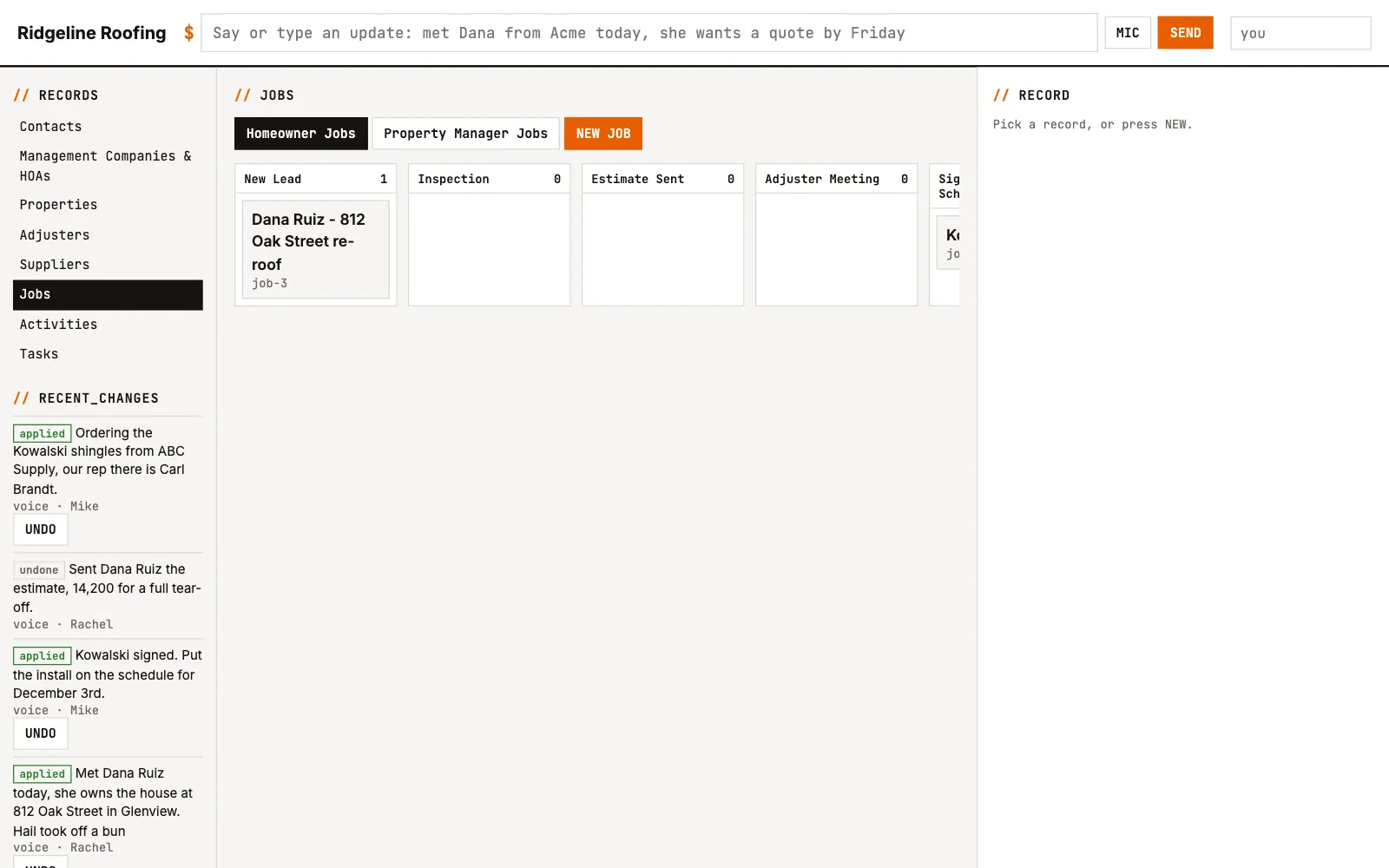
Ridgeline Roofing's CRM: the homeowner jobs board with Dana Ruiz in New Lead and Kowalski in Signed & Scheduled, and a feed of spoken updates, each with an Undo button.
The roofer's CRM. Left: every spoken update, with who said it and an Undo. Middle: the homeowner board.

QUESTIONS

What owners ask first.

Do I have to talk to it?
No. It's a normal CRM with boards, tables, and forms. Talking is just faster than typing when you're standing in a driveway, so that's the part people end up using.
What happens when it gets something wrong?
Every update is one change you can see, with an Undo button that takes the whole thing back. When it isn't sure, or it thinks you might mean somebody already in there, it asks you first instead of saving.
What if we outgrow the first version?
Tell it what to start tracking and it adds the field, the list, or the pipeline stage. It only ever adds. Anything that could lose data, like deleting or renaming a field, comes to me, and I do it by hand with you.
We already have a spreadsheet.
Good. Bring it to the first call. Your column headers tell me most of what your CRM should look like, and your rows become the first records.
Who owns the data?
You do. Each CRM is its own database, not a row in somebody else's. You can export all of it whenever you want.
Can our customers talk to it?
Not yet. It's built for your team first. A customer-side version, where a client can update their own contact info or ask for a quote and your staff approves it, is next.

YOUR_FITTING

I'm building the first few by hand.

Thirty minutes on how your jobs really go, and you'll see your CRM with sample data in it before you spend anything. Priced per business, not per seat, so the whole crew can use it.